Introducing Linear Context, Reviews That Know Why the Code Was Written
Revix AI now finds the Linear issue behind every pull request, reviews the code against what the issue asked for, and updates the issue when the PR merges.

Linear Context is available on the Pro plan. Revix AI finds the Linear issue behind every pull request and reviews the code against what the issue asked for. When the PR merges, Revix AI updates the issue.
A review that only sees the diff knows what changed. It should also know why. Linear Context does for Linear teams what Jira Context does for Jira, through the same review path.
On every pull request with a linked Linear issue, Revix AI:
- Finds the issue: from the branch name, PR title, or PR body
- Reads it: description, acceptance criteria, status, labels, and comments
- Checks the code: each acceptance criterion is marked met, not met, or not applicable
- Moves it: to the status you pick when the PR opens, and again when it merges
- Comments on merge: with what shipped and a link to the PR
Finds and reads the Linear issue
Revix AI scans the branch name, PR title, and PR body for issue keys, the ENG-123 shape every Linear team uses. Branches made with Linear's "Copy git branch name", like jane/eng-123-export-csv, work too. Revix AI looks those up only when the prefix matches one of your team keys.
You don't add magic words like Fixes ENG-123. Revix AI reads up to 5 issues per review.
Once a key resolves against your connected workspace, Revix AI pulls the issue's details:
- title and description
- acceptance criteria
- status, labels, and the parent issue or project
- assignee
- up to 20 comments from the discussion
That context goes into the review, alongside your repo's conventions and the rules Revix AI has learned from your repo. So the review can flag code that follows every convention and still misses part of the issue.
Checks the code against the acceptance criteria
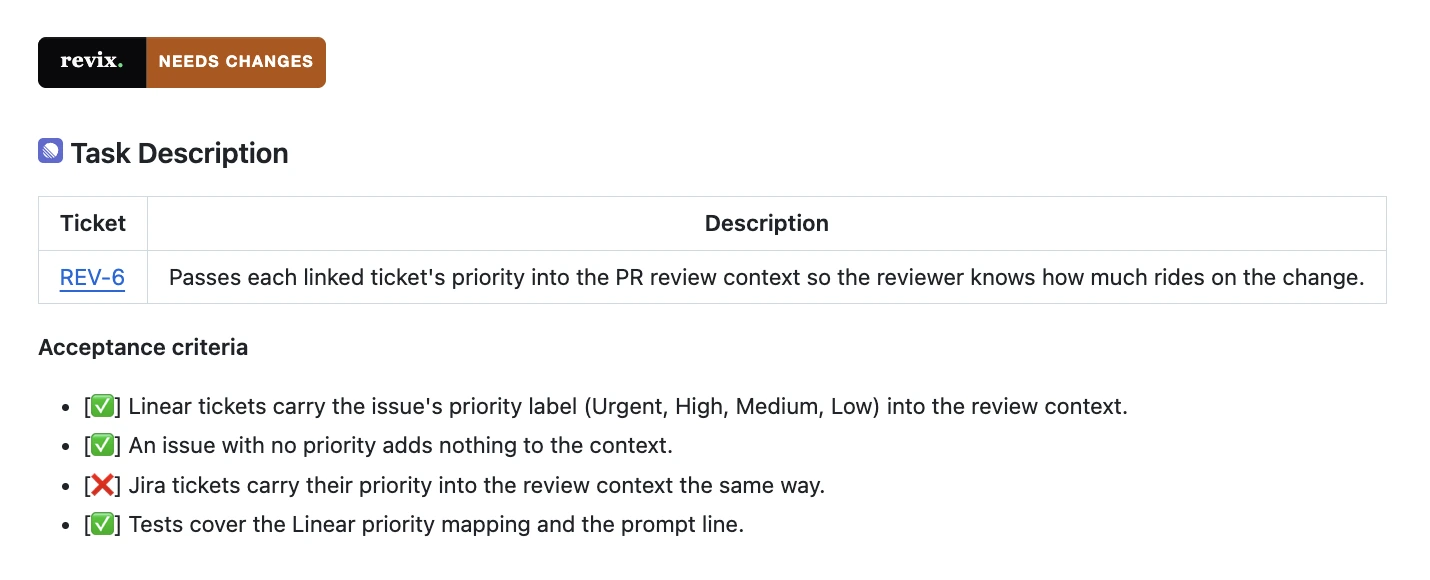
Every PR summary now opens with the linked issue and one sentence on what it asks for. If the issue lists acceptance criteria, a Task Description table checks each one against the code:
- ✅ met
- ❌ not met
- ➖ not applicable
A criterion that isn't met can also get a PR comment that names it and says why.
A real PR from our own repo
On a PR in our own repo, a change meant to pass ticket priority into the review covered Linear but missed Jira. Revix AI marked 3 of 4 criteria met, flagged the Jira one, explained why, and the review came back as needs changes.
The comment Revix AI left on the PR for the unmet criterion:
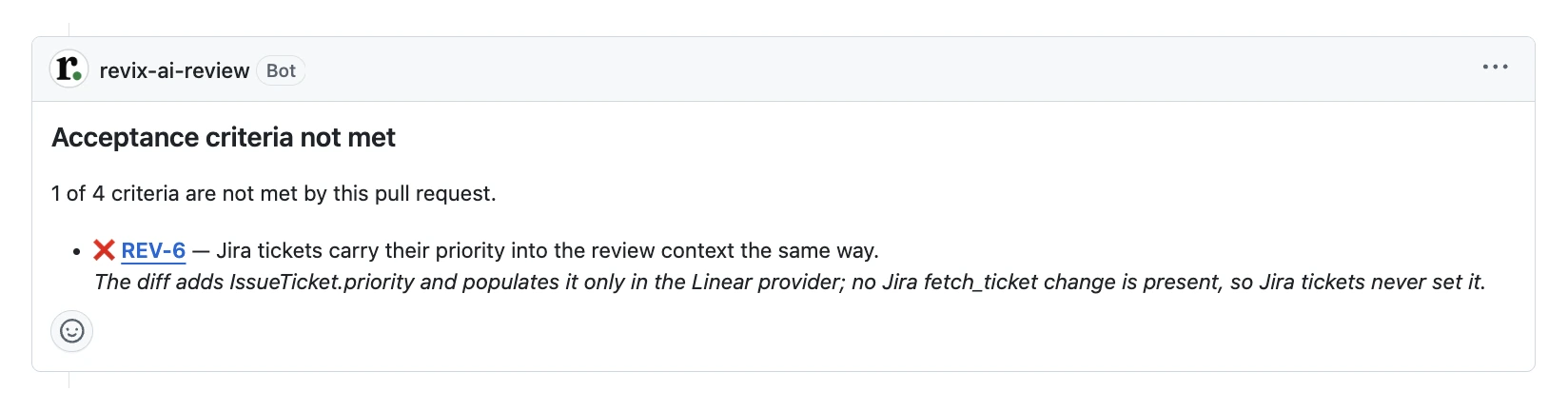
The diff had no Jira change to flag. The requirement to cover Jira was only in the issue.
Moves the issue on your board
Revix AI moves the issue when it links one to a PR, and again when that PR merges. In the integration's settings, you map each event to one of your own status names, like In Progress or Done. Leave one empty and Revix AI won't move the issue for that event. It fits the board your team already runs.
Comments on merge
On merge, Revix AI also comments on the issue with what shipped and a link to the PR. People who work in Linear see the outcome where they already look.
None of this blocks the review. If Linear is slow or a status change fails, the review still runs and still posts.
What to know before you connect Linear
- Who connects it: a workspace owner or admin, from a Pro workspace, through Linear's OAuth.
- Who it posts as: comments and status changes appear as the user who connected Linear.
- Status names: they have to match a workflow state in your Linear team. States are set per team, so a mapping only moves issues in teams that use those names.
- Jira and Linear together: if both are connected, Revix AI tries each key against each tracker and skips the one where it isn't found.
Why ticket context matters
Repo context tells the reviewer whether the code belongs here. Ticket context tells it whether the code is what you asked for. Both live outside the diff, and the best reviewers on your team have always read both.
We've written before about what a reviewer sees when it reads the whole repo instead of just the diff. Linear Context applies the same idea to a different gap.
Reading the ticket has been part of the plan since we launched Revix AI. Now it works for Linear too.
Linear Context is part of the Pro plan; see the pricing page. Connect it from a Pro workspace and see it on your next PR: revix.ai. Every team starts with a 14-day free trial, no card required.
Frequently asked questions
Keep reading
- Introducing Jira Context, Reviews That Know Why the Code Was WrittenRevix AI now finds the Jira ticket behind every pull request, reviews the code against what the ticket asked for, and updates the ticket when the PR merges.
- Repo-Aware AI Code Review vs. Diff-Based ReviewRepo-aware vs diff-based AI code review: diff review reads only the patch. Repo-aware review catches broken conventions, duplicate abstractions, and drift.