Best AI code review tools: 9 tools compared
Compare 9 AI code review tools by Git host and price. See how 5 reviewed the same public PR. Prices checked October 2026. By Revix.


The best AI code review tool depends on your Git host, how you want to set standards, and how you pay. This page compares 9 tools, lists them in A to Z order, and shows how five of them reviewed the same public pull request. Revix publishes this page and is one of the tools, so read it with that in mind.
Disclosure: Revix makes an AI code review product, and Revix is one of the tools on this page. This is a comparison written by a vendor. Tools are listed in alphabetical order. The order is not a ranking.
Quick answer: pick by situation
There is no single list of the best AI code review tools for every team. Find your situation below and try that tool first. Tools inside a row are in A to Z order.
| Your situation | Try first |
|---|---|
| You already pay for GitHub Copilot | GitHub Copilot code review |
| You run self-hosted Git (GitHub Enterprise Server, GitLab Self-Managed, Bitbucket Data Center) | CodeRabbit, Cursor Bugbot, Graphite Agent (GitHub Enterprise Server on Enterprise), Greptile (Enterprise), Qodo, Sourcery (GitHub Enterprise Server on Enterprise, self-hosted GitLab) |
| You are on Azure DevOps | CodeRabbit, Cursor Bugbot, GitHub Copilot code review (preview), Qodo |
| Your team already works in Cursor | Cursor Bugbot |
| You ship with stacked pull requests on GitHub | Graphite Agent |
| You miss bugs outside the diff and want runtime checks | Greptile |
| You need governance across many repos, or Gerrit | Qodo |
| You are on GitHub only and want short comments and a free starter plan | Cubic |
| You want a lower seat price on GitHub or GitLab | Sourcery |
| You want review rules from your own repo, without writing them first | Revix |
New to the topic? Start with what AI code review is and how it works.
How we compared
We compared the 9 tools on six criteria. Every competitor fact comes from the vendor's own docs or pricing page. We checked them on October 26, 2026.
| Criterion | What we checked |
|---|---|
| Git hosts | GitHub, GitLab, Bitbucket, and other hosts, in cloud and self-hosted editions |
| Standards | How your team's conventions get into the review |
| Comment style | How a comment is labeled and what extras it carries |
| Price shape | Seats, credits, or usage, and the lowest paid plan |
| Free or open source | Free plans, free public repos, and open source programs |
| Best fit | The team situation where the tool fits |
We did not use benchmark scores from other sites. Every competitor fact traces to a vendor page, and every result in the test section is our own run.
We ran five of the tools on one public test PR. The other four are marked "not tested by us", and their facts come from docs only.
The 9 tools, A to Z
Each block has the same fields: best for, where it wins, tradeoff, Git hosts, price, and the test PR. Prices were checked on October 26, 2026.
CodeRabbit
- Best for: teams that want wide Git host coverage and review in the PR, CLI, and IDE.
- Where it wins: it covers cloud and self-hosted editions of all three big hosts, plus Azure DevOps. It also learns from your feedback and your team's guidelines.
- Tradeoff: unit test generation and the prioritized PR queue start on the Team plan, at $48 per user a month billed annually.
- Git hosts: GitHub.com, GitHub Enterprise Server, GitLab.com, GitLab Self-Managed, Bitbucket Cloud, Bitbucket Data Center, and Azure DevOps, per CodeRabbit's docs.
- Price: Essentials is $24 per user a month billed annually, with a 14-day trial. Public repos are free, per coderabbit.ai/pricing.
- Test PR: not tested by us. More in CodeRabbit alternatives compared.
Cubic
- Best for: GitHub teams that want short comments and fixes on the PR.
- Where it wins: you write team rules as custom agents, and paid plans include auto-fix. Its Starter plan is free for 20 PR reviews a month.
- Tradeoff: it works on GitHub only. Its docs answer "Not yet" when asked about GitLab or Bitbucket.
- Git hosts: GitHub, per Cubic's docs.
- Price: Team is $30 per developer a month billed yearly, or $40 billed monthly. Team covers 40,000 reviewed lines per developer. Public repos are free, per cubic.dev and cubic.dev/pricing.
- Test PR: caught both planted issues. More in Cubic alternatives compared.
Cursor Bugbot
- Best for: teams that already work in Cursor.
- Where it wins: Autofix sends a Cursor Cloud Agent to fix what Bugbot finds. Rules come from
.cursor/BUGBOT.mdfiles, team rules, and rules Bugbot learns. - Tradeoff: billing is usage-based, so you need Cursor's pricing page to estimate a month of reviews.
- Git hosts: GitHub (including Enterprise Server), GitLab (including self-hosted), Bitbucket (including Data Center), Azure DevOps Services, and Cursor Origin, per Bugbot's docs.
- Price: usage-based billing. See Cursor's pricing page for current rates.
- Test PR: not tested by us.
GitHub Copilot code review
- Best for: teams on GitHub that already pay for Copilot.
- Where it wins: there is no new vendor to approve. It reads
.github/copilot-instructions.md, path-specific*.instructions.mdfiles, andAGENTS.mdfrom the PR's head branch. - Tradeoff: each review uses AI credits plus GitHub Actions minutes. GitHub's docs estimate $0.05 to $1 of AI credits per review at Lite effort. At Balanced, the default, the estimate is $0.25 to $5.
- Git hosts: the docs name GitHub.com and Azure DevOps (public preview), plus GitHub's CLI, mobile app, and several IDEs.
- Price: Copilot Pro is $10 a month. Business is $19 and Enterprise $39 per seat a month. Copilot Free does not include code review, per GitHub's plans page.
- Test PR: not tested by us. GitHub's docs say Copilot "is not guaranteed to spot all problems", so validate its feedback with human review.
Graphite Agent
- Best for: teams that ship with stacked pull requests on GitHub.
- Where it wins: AI review sits inside Graphite's stacking CLI, PR inbox, and merge queue.
- Tradeoff: unlimited AI reviews start on the Team plan. Hobby and Starter get limited AI reviews.
- Git hosts: GitHub, plus GitHub Enterprise Server on Enterprise, per graphite.dev/pricing. Its docs list no GitLab or Bitbucket.
- Price: Hobby is free for personal repos. Starter is $20 and Team $40 per user a month billed annually.
- Test PR: caught the env issue but not the pagination issue. We enabled it the next day.
Greptile
- Best for: teams that want a graph of the codebase behind each review.
- Where it wins: TREX runtime validation (beta) runs your code on the PR. Enterprise adds self-hosting and more self-hosted Git hosts.
- Tradeoff: Pro bills per credit, so the bill depends on review depth. A Base review costs 1 credit, Plus 3, and Apex 10.
- Git hosts: GitHub, GitLab.com, and Bitbucket Cloud on all plans. Enterprise adds GitHub Enterprise Server, GitLab Self-Managed, Bitbucket Data Center, and Gitea, per Greptile's docs.
- Price: Starter is free for 1 active developer with 50 credits a month. Pro is $1 per credit with no seat fees, and credits are shared across your org. Enterprise is custom. Details on greptile.com/pricing.
- Test PR: caught both planted issues. More in Greptile alternatives compared.
Qodo
- Best for: organizations that want governance across many repos and Git hosts.
- Where it wins: it has a rules system and cross-repo review. Enterprise adds on-prem, air-gapped setups, and Gerrit.
- Tradeoff: there is no permanent free tier. After the trial, you buy credit packs.
- Git hosts: GitHub, GitLab, and Bitbucket in cloud and self-managed editions, plus Azure DevOps and Gerrit, per Qodo's docs. GitHub Enterprise needs single-tenant or on-prem.
- Price: Pro Team starts at $30 a month, with credits at $0.012 each pooled across up to 30 users. The trial is 14 days with no card, per qodo.ai/pricing.
- Test PR: not tested by us. More in Qodo alternatives compared.
Revix
- Best for: teams that want every PR reviewed against rules taken from their own repo, without writing a rulebook first.
- Where it wins: Revix reads your repo and turns its patterns into review rules. You can edit, add, or disable any rule. On our test PR, Revix's comments carried a Conventional Comments label. A comment based on a rule links that rule.
- Tradeoff: it supports GitHub.com, GitLab.com, and Bitbucket Cloud only. On self-hosted Git or Azure DevOps, pick another tool from this page.
- Git hosts: GitHub.com, GitLab.com, and Bitbucket Cloud.
- Price: Starter is €20 and Pro €40 per seat a month billed annually. Paid plans start with a 14-day trial, no card required. The Open Source plan is free for public repositories, per revix.ai/pricing.
- Test PR: caught both planted issues and linked the team rule, in this run, on this PR, on default settings. Its comments had no one-click fix or prompt for AI agents.
See how it works in Revix AI code review for GitHub.com, GitLab.com, and Bitbucket Cloud. For data from Revix's own pull requests, read what 200 pull requests taught us.
Sourcery
- Best for: GitHub or GitLab teams that want a lower seat price.
- Where it wins: Pro is $12 per developer a month billed annually. Team adds security scanning across your repos.
- Tradeoff: its docs and pricing page do not list Bitbucket.
- Git hosts: GitHub, GitLab, GitHub Enterprise Server, and self-hosted GitLab, per Sourcery's docs. GitHub Enterprise Server is on the Enterprise plan.
- Price: Pro is $12 and Team $24 per developer a month billed annually. The trial is 14 days with no card. Public repos are free, per sourcery.ai/pricing.
- Test PR: caught both planted issues.
Side-by-side comparison
These two tables put the main facts in one place. The first covers how each tool works, and the second covers price.
How the tools work
| Tool | Git hosts | How standards are set | Comment style on the test PR | Ran on test PR |
|---|---|---|---|---|
| CodeRabbit | GitHub, GitLab, Bitbucket (cloud and self-hosted), Azure DevOps | Guidelines plus learnings from feedback | Not tested by us | No |
| Cubic | GitHub | Custom agents you write | Rank (P2) plus a prompt for AI agents | Yes |
| Cursor Bugbot | GitHub, GitLab, Bitbucket (incl. self-hosted), Azure DevOps | BUGBOT.md, team rules, learned rules | Not tested by us | No |
| GitHub Copilot code review | GitHub.com, Azure DevOps (preview) | Instruction files, AGENTS.md, skills | Not tested by us | No |
| Graphite Agent | GitHub | Review customization on Team | No label, one-click suggested change | Partial (next day) |
| Greptile | GitHub, GitLab.com, Bitbucket Cloud; self-hosted on Enterprise | Custom rules plus learning | Rank (P2) plus links to run artifacts | Yes |
| Qodo | GitHub, GitLab, Bitbucket, Azure DevOps, Gerrit | Rules system | Not tested by us | No |
| Revix | GitHub.com, GitLab.com, Bitbucket Cloud | Rules mined from your repo, editable | Conventional Comments label, rule link when a rule applies | Yes |
| Sourcery | GitHub, GitLab (incl. self-hosted) | Custom review rules | Rank (Medium) plus a prompt for AI agents | Yes |
AI code review tools pricing
Prices checked on October 26, 2026. Prices change, so confirm on each vendor page before you buy.
| Tool | Paid start | Billing shape | Free or open source | Checked | Source |
|---|---|---|---|---|---|
| CodeRabbit | $24 per user a month, annual | Per seat | Public repos free | Oct 26, 2026 | coderabbit.ai |
| Cubic | $30 per developer a month, billed yearly | Per seat, with line allowances | 20 PR reviews a month free, public repos free | Oct 26, 2026 | cubic.dev |
| Cursor Bugbot | Usage-based billing. See Cursor's pricing page for current rates | Usage-based | See Cursor's pricing page | Oct 26, 2026 | cursor.com |
| GitHub Copilot code review | Copilot Pro $10 a month | Plan plus AI credits and Actions minutes | Not on Copilot Free | Oct 26, 2026 | docs.github.com |
| Graphite Agent | $20 per user a month, annual | Per seat | Hobby free for personal repos | Oct 26, 2026 | graphite.dev |
| Greptile | $1 per credit | Credits, no seat fees | Starter free for 1 developer, non-commercial OSS free | Oct 26, 2026 | greptile.com |
| Qodo | $30 a month | Pooled credits | Open source program, on application | Oct 26, 2026 | qodo.ai |
| Revix | €20 per seat a month, annual | Per seat | Open Source plan, free for public repositories | Oct 26, 2026 | revix.ai |
| Sourcery | $12 per developer a month, annual | Per seat | Public repos free | Oct 26, 2026 | sourcery.ai |
One public test PR, five reviewers
On October 8, 2026, we ran Cubic, Graphite, Greptile, Revix, and Sourcery on one public test PR. This is one small test, not a benchmark, with one run each.
We planted two issues in a Hono and TypeScript repo. Each one breaks a rule written in the repo, which favors tools that read written rules.
| Tool | First comment | Both issues caught | Words per comment | Links the team rule |
|---|---|---|---|---|
| CodeRabbit | Not tested by us | Not tested by us | Not tested by us | Not tested by us |
| Cubic | ~4 min | Yes | 27 to 37 | No |
| Cursor Bugbot | Not tested by us | Not tested by us | Not tested by us | Not tested by us |
| GitHub Copilot code review | Not tested by us | Not tested by us | Not tested by us | Not tested by us |
| Graphite | n/a (enabled next day) | No (env issue only) | 132 | No |
| Greptile | ~12 min | Yes | 84 to 100 | No |
| Qodo | Not tested by us | Not tested by us | Not tested by us | Not tested by us |
| Revix | ~1 min | Yes | 38 to 42 | Yes |
| Sourcery | ~3 min | Yes | 64 to 84 | No |
These results hold in this run, on this PR, on default settings. All tools ran on defaults, and we did not give them the rule text. Do not read the table as a ranking.
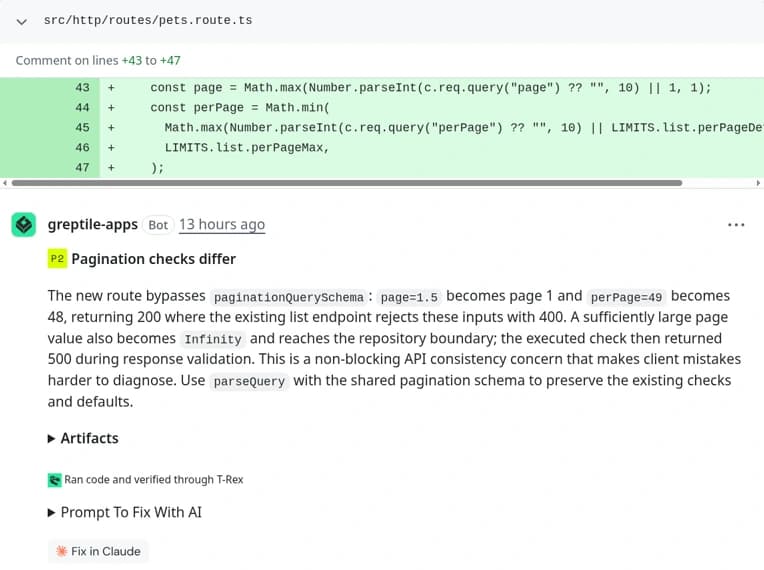
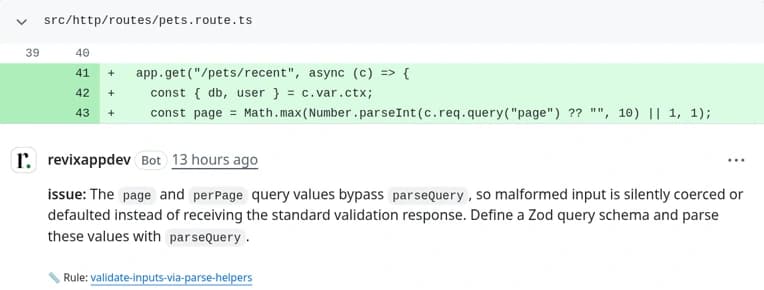
For the setup, every comment, and how each one reads, see the full test write-up.
Support by Git host
All 9 tools review pull requests on GitHub.com. Support drops off on GitLab, Bitbucket, and self-hosted editions, so check your host first. Facts are from vendor docs, checked on October 26, 2026.
| Tool | GitHub | GitLab | Bitbucket | Other hosts |
|---|---|---|---|---|
| CodeRabbit | GitHub.com, Enterprise Server | GitLab.com, Self-Managed | Cloud, Data Center | Azure DevOps |
| Cubic | GitHub | Not listed | Not listed | None listed |
| Cursor Bugbot | GitHub, Enterprise Server | GitLab, self-hosted | Bitbucket, Data Center | Azure DevOps Services, Cursor Origin |
| GitHub Copilot code review | GitHub.com | Not listed | Not listed | Azure DevOps (preview) |
| Graphite Agent | GitHub, Enterprise Server (Enterprise) | Not listed | Not listed | None listed |
| Greptile | GitHub, Enterprise Server (Enterprise) | GitLab.com, Self-Managed (Enterprise) | Cloud, Data Center (Enterprise) | Gitea (Enterprise) |
| Qodo | GitHub, Enterprise (single-tenant or on-prem) | GitLab cloud, Self-Managed | Cloud, Data Center | Azure DevOps, Gerrit |
| Revix | GitHub.com | GitLab.com | Bitbucket Cloud | None |
| Sourcery | GitHub, Enterprise Server (Enterprise) | GitLab.com, self-hosted | Not listed | None listed |
AI code review tools for GitHub
Yes, you can use AI code review on GitHub with any of the 9 tools. For GitHub Enterprise Server, look at CodeRabbit, Cursor Bugbot, Graphite, Greptile, Qodo, or Sourcery. Several of them need an Enterprise plan for it. Revix covers GitHub.com through AI code review for GitHub.
AI code review tools for GitLab
Yes, GitLab teams can use AI code review. CodeRabbit, Cursor Bugbot, Greptile, Qodo, Revix, and Sourcery list GitLab.com. For GitLab Self-Managed, look at CodeRabbit, Cursor Bugbot, Greptile Enterprise, Qodo, or Sourcery. Revix covers GitLab.com through AI code review for GitLab.
AI code review tools for Bitbucket
Yes, five tools here list Bitbucket Cloud: CodeRabbit, Cursor Bugbot, Greptile, Qodo, and Revix. For Bitbucket Data Center, look at CodeRabbit, Cursor Bugbot, Greptile Enterprise, or Qodo. Revix covers Bitbucket Cloud through AI code review for Bitbucket.
When each tool fits
Start from your biggest review problem, then pick the tool built around it. Here is when each one is the better fit, including when you should pick someone other than Revix.
- You run self-hosted Git or Azure DevOps. For self-hosted Git, pick CodeRabbit, Cursor Bugbot, Graphite Agent, Greptile, Qodo, or Sourcery, and check the Git host table for the editions each one covers. For Azure DevOps, pick CodeRabbit, Cursor Bugbot, GitHub Copilot code review (preview), or Qodo. Revix does not support those hosts.
- You already pay for Copilot. Try Copilot code review before you add a vendor. Watch the AI credit and Actions minutes it uses.
- Authors want one-click fixes or prompts for AI agents. On our test PR, Cubic, Graphite, and Sourcery offered these and Revix did not. Cursor Bugbot has Autofix.
- You miss bugs outside the diff. Try Greptile and its runtime checks.
- You ship stacked PRs. Graphite Agent fits that workflow.
- You need governance across many repos. Qodo covers rules, cross-repo review, and on-prem setups.
- You want a lower seat price on GitHub or GitLab. Look at Sourcery.
- Comments do not match how your repo already works. Try Revix, which takes its rules from your code.
Static analysis gates such as Sonar, Codacy, Snyk, or Semgrep pair well with an AI reviewer. The gate runs fixed checks for quality and security on every build. The AI reviewer comments on whether the change fits your code.
Free and open source options
Most tools here have a free path, but each one has limits. Facts were checked on October 26, 2026.
- CodeRabbit: free reviews on public repos.
- Cubic: Starter is free for 20 PR reviews a month, and public repos are free.
- Cursor Bugbot: usage-based billing. See Cursor's pricing page for current rates.
- GitHub Copilot code review: not included on Copilot Free.
- Graphite Agent: Hobby is free for personal repos, with limited AI reviews.
- Greptile: Starter is free for one active developer. Qualified non-commercial open source projects are free.
- Qodo: no permanent free tier. Open source projects can apply for free access.
- Revix: the Open Source plan is free for public repositories. Read more about free and open source AI code review.
- Sourcery: free for public repos on GitHub or GitLab.
Run a two-week pilot
Two weeks on your own pull requests will tell you more than any list. Use this checklist.
- Shortlist two or three tools from the pick by situation table.
- Use your last 10 merged PRs as the test set, so every tool sees the same code.
- Keep the same settings for every tool. Defaults are a fair start.
- Count the comments your team acted on and the ones it ignored.
- Note setup time and the time to the first useful comment.
- After two weeks, ask your reviewers which tool they would miss.
If you are on GitHub.com, GitLab.com, or Bitbucket Cloud, add Revix AI code review to your pilot. Paid plans start with a 14-day free trial, no card required.
Frequently asked questions
Keep reading
- CodeRabbit alternatives: 6 tools comparedCompare 6 CodeRabbit alternatives for AI code review. See who each one fits, where CodeRabbit still wins, and prices checked October 2026.
- Cubic alternatives: 6 AI code review tools comparedCompare 6 Cubic alternatives for AI code review. See where Cubic wins, why teams look past it, who each tool fits, and prices checked October 2026.